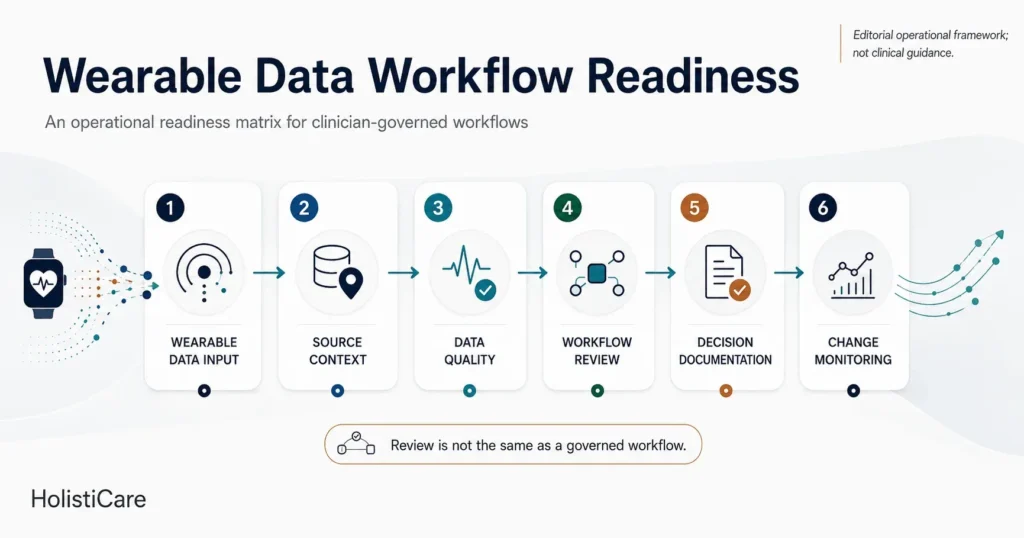
A feature list can tell a clinic what software is supposed to do. A workflow demonstration shows how people, data and decisions connect. If you lead a longevity, concierge or functional medicine clinic, bring one representative, fictional member scenario to a software demo and ask the presenter to follow it from incoming information to the next clinical review.
This is an evaluation script, not a claim that every vendor supports every step. Record what is shown live, what is described but not demonstrated, what depends on configuration or integration, and what remains a manual responsibility. Keep clinical decisions with qualified professionals.
For a broader procurement framework, read how to evaluate clinical AI software. For the operational problem after a first assessment, read why follow-up breaks down. This article focuses on the narrower task of documenting what one product demonstration actually shows across a single scenario.
Key takeaways
- Trace one workflow. Bring a fictional member scenario from incoming information through clinician review and follow-up.
- Separate demonstration from description. Record what is shown live, what is presented on a slide, and what depends on configuration, integration or manual work.
- Keep clinical authority explicit. Ask who reviews, approves and owns each handoff; qualified professionals retain clinical decisions.
- Use the worksheet as a decision record. It exposes evidence gaps for a buying team; it does not validate a vendor’s product or clinical outcomes.
Evidence scope
This article is an editorial script for evaluating a software demonstration, not a comparative vendor test or a validated clinical instrument. Its six checkpoints organize questions for a clinic-specific fictional scenario. The U.S. Office of the National Coordinator for Health Information Technology’s 2025 SAFER guide on test results reporting and follow-up informs the narrow example about deliberate result follow-up. That guide addresses EHR-based result communication; applying its emphasis to a broader clinic operating workflow is an editorial inference.
No live vendor implementation, integration, workflow outcome or product capability is established here. A buyer should verify each proposed route, role and dependency in the actual deployment. The fictional example shows how to record evidence without claiming a vendor capability; the six blank rows are for what the presenter demonstrates and what remains unresolved, not for assigning a score or asserting compliance.
Start with the clinic’s decision, not the vendor’s menu
Choose a routine workflow that matters to the buying team: a new biomarker panel arrives, a clinician reviews it alongside prior information, a plan is considered, and the clinic arranges the next review. Use invented data during a demonstration. Define which clinician and operations roles participate and where your existing system of record remains in use.
Ask the presenter to keep the same scenario throughout. Switching between unrelated screens can conceal a handoff that the team will have to manage manually.
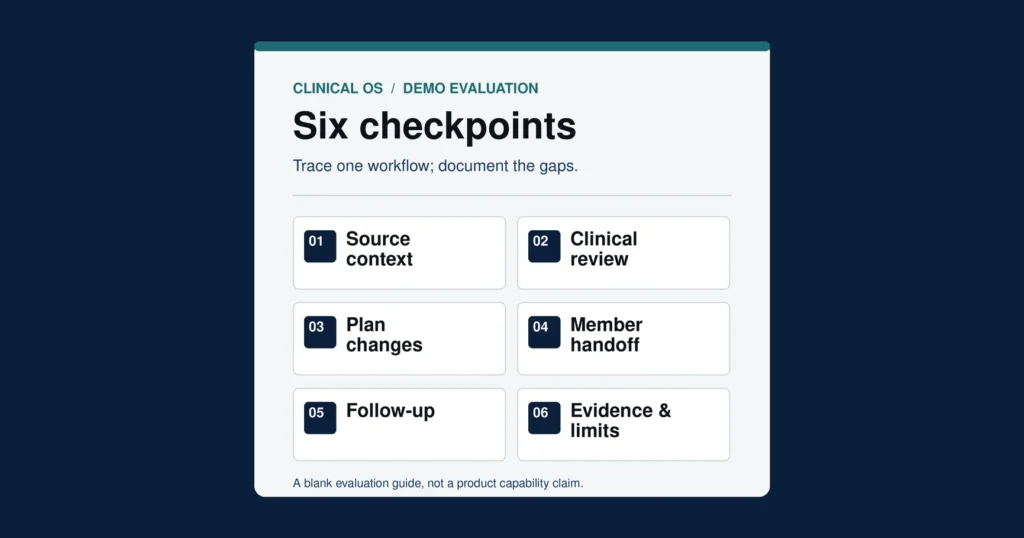
Six checkpoints to inspect
1. Intake and source context
Where does each result or document enter the workflow? Can the reviewer see its source, date and relevant context? Ask which data routes are available in the proposed deployment, which require a separate integration or import, and what happens when a source is missing or cannot be reconciled. Do not infer a live integration from a sample screen.
2. Clinical review and authority
Who can inspect an interpretation, challenge it and decide what happens next? Have the presenter show the boundary between a suggested interpretation and a clinician’s decision. Ask whether a pending item is visibly pending and who is responsible for it. A claim of “human oversight” is too broad until the actual review step and authority are clear.
3. Protocol and plan changes
If the clinician changes a proposed plan, where is the approved version recorded? Ask who can approve a change, what remains visible from the earlier version and how an exception is documented. The clinic should decide which elements of its method require a named clinical owner; the software demonstration can then show whether the proposed workflow supports that decision.
4. The handoff to the member-facing team
What does the clinic team see after approval, and what would a member see? Ask which information is ready for communication, which needs another review and who sends it. Keep the question about handoff and responsibility; a polished portal screen alone does not establish that an approval process works end to end.
5. Follow-up and unresolved work
Before leaving the scenario, create a next step: for example, a planned review after a future result. Ask who owns it, how the team recognizes that it is overdue, and how a missing result or unanswered task is surfaced. The U.S. Office of the National Coordinator for Health Information Technology’s SAFER guide on test results reporting and follow-up addresses safety practices for EHR-based result communication and management. Applying its emphasis on deliberate follow-up checks to a broader clinic operating workflow is an editorial inference, not an endorsement of a product or a claim of regulatory compliance.
6. Evidence and limitations
For each step, ask: Was this shown in the current product, a prototype or a slide? Is it available to this clinic with its actual data sources and roles? What needs configuration, a third party or a manual process? Who can provide implementation evidence and clarify limits? Record unanswered questions rather than converting a demonstration into a capability promise.
Leave with a decision record
Use one row per checkpoint during your own demo. The first, fictional row models the level of detail to capture; the following six rows are blank for your clinic. Neither the example nor the worksheet is evidence of any vendor’s capabilities.
On a narrow screen, scroll the table horizontally. The copyable version below contains only the six blank checkpoint rows.
| Step | Shown live, slide or described? | Clinic owner | Configuration or integration dependency | Evidence to request | Open issue |
|---|---|---|---|---|---|
| Fictional completed example — not evidence of any vendor capability: Intake and source context | In this invented demo, a sample result screen was shown live; the lab feed was only described. No live integration was demonstrated. | Operations lead records the intake route; clinical lead checks source/date/context before use. | Clinic-specific lab feed or import mapping requires confirmation. | Sample-screen record and written source-field mapping; ask for a test of a missing result using invented data. | Who detects an absent result, who owns it, and where is its unresolved state visible? |
| Intake and source context | |||||
| Clinical review and authority | |||||
| Protocol and plan changes | |||||
| Member-facing handoff | |||||
| Follow-up and unresolved work | |||||
| Evidence and limitations |
Copy the six-row worksheet
Select and copy the text below, then paste it into a spreadsheet or document. Fill each empty cell with what your clinic actually observes.
Step	Shown live, slide or described?	Clinic owner	Configuration or integration dependency	Evidence to request	Open issue
Intake and source context
Clinical review and authority
Protocol and plan changes
Member-facing handoff
Follow-up and unresolved work
Evidence and limitations
Conclusion: document the demonstrated workflow
The clinical lead can note whether the proposed review and approval boundaries match the clinic’s method. The operations lead can map ownership of intake, handoffs and follow-up. The buying team can then compare systems against the same scenario and identify which claims require technical or contractual verification before selection.
This checklist does not measure efficiency, clinical outcomes or demand for a particular platform. It makes an evaluation conversation more specific.
Before the meeting, prepare an invented baseline biomarker panel and a later or missing result; list the relevant source systems and any import assumptions; identify who owns clinical review, approval, communication and follow-up; and note the decision you need to make and known constraints. Use invented data, not member records.
Book a HolistiCare workflow demo. Bring one fictional member scenario, the data sources and current systems it crosses, and the clinical and operations roles responsible for review, approval, communication and follow-up. Use the six worksheet rows to record what is shown live, what is shown on a slide or described, what depends on configuration or integration, and what remains unresolved for your clinic.
HolistiCare provides clinical decision-support infrastructure; it is not a licensed medical provider or electronic health record. All diagnostics, care protocols, and clinical decisions remain exclusively the responsibility of qualified healthcare professionals. Insights generated by HolistiCare’s AI engine are for clinical and informational use only and do not constitute medical advice, diagnosis, or treatment.
References
- U.S. Office of the National Coordinator for Health Information Technology. 2025 SAFER Guide: Test Results Reporting and Follow-Up. The guide is cited for its EHR-based result follow-up context, not as validation of this editorial checklist or any product.